











At Coffee IT we see AI not as a replacement for developers, but as a tool we keep using more cleverly. Not to think less, but to work together more efficiently across projects.
One of the ways we do that is by sharing skills: small, reusable instruction sets that turn certain input into usable output. Quickly converting a presentation into our house style. Adding code that meets our coding standards. Scanning an external app for quality, maintainability, scalability and security.
In this blog we explain what that means in practice, why we manage skills centrally, and what we have learned along the way.
From loose prompts to shared knowledge
When we first started using AI in our daily work, everyone discovered it in their own way. One colleague had a set of prompts that worked well for code generation. Another experimented with their own rules in their editor. Someone else wrote clever tooling for marketing purposes.
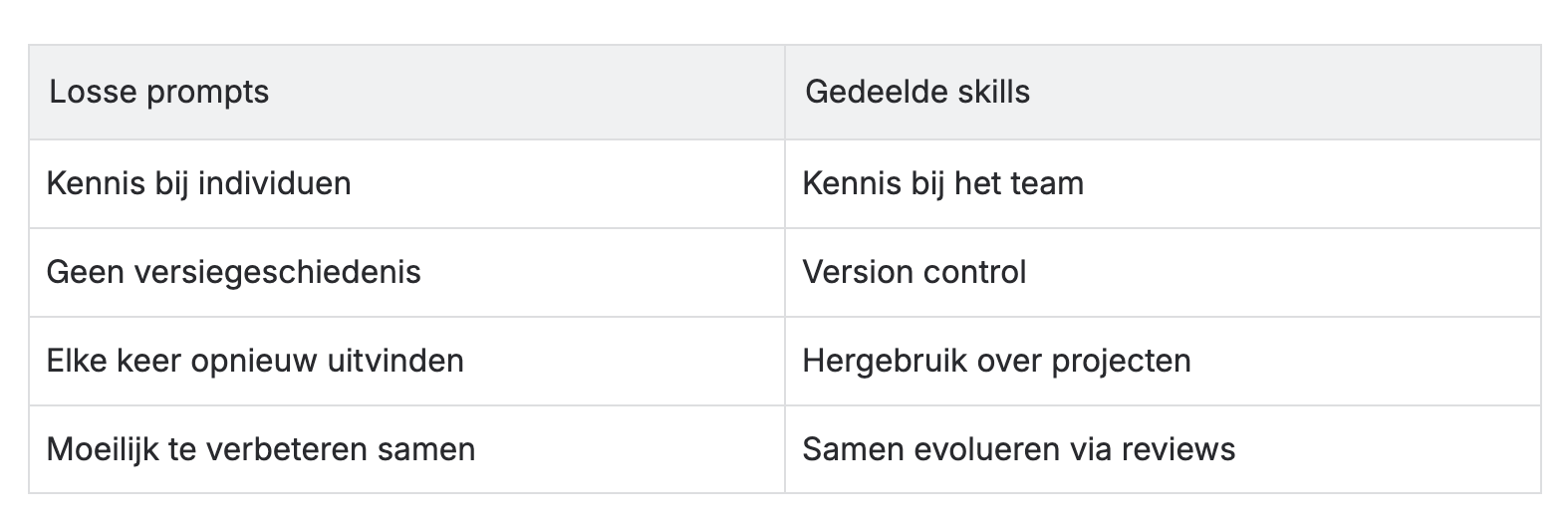
That works, but the knowledge was spread across individuals. What one person had tried, another had to rediscover or did not know about. And once a prompt was good, there was no effective way to improve it reliably and verifiably together, or to use it consistently in another project.
We were looking for something closer to how we already build software: version control, collaboration and reuse.
What is a skill?
A skill is essentially a structured file with instructions for an AI agent. It describes when the skill should be used, which steps are followed and which output is expected.
The difference from a loose prompt lies in reusability, context and output management. A skill contains not only "do this", but also the background needed to do it well, in the same output structure every time. Think of applying our house style, our coding standards, or the criteria we use to assess a codebase.
Skills are deliberately small and focused. They do one thing well: turn input into output, within a specific competence.
How we share skills
All skills live in a shared repository. Anyone at Coffee IT can add or improve a skill through a merge request (a proposed change that colleagues review). Just like with code: someone proposes something, colleagues review it, and after the merge the improvement is available to everyone.
That gives us a number of advantages that loose prompts can never offer:
- Version control -> we see what changes, can roll back, and skills evolve just like our projects.
- Improving together -> a skill that works well today can get better tomorrow through a colleague's input.
- Project-independent -> skills are added to existing projects as a git submodule. That way every project works with the same, up-to-date set of skills, and a colleague can change the skills directly and share new insights with other colleagues, independent of any single project.
We even have a skill for writing a skill. That sounds meta, but it lowers the barrier: you do not have to work out the format yourself, and new skills are built consistently from the start.
Three skills from practice
Presentations in house style We regularly deliver presentations for clients, internally or at events. Our presentation skill turns raw input into slides that follow the Coffee IT house style. No manual formatting, no "just quickly fixing the colours and the logo".
Coding standards When generating code with AI, the output is not always consistent. Our coding standards skill makes sure generated code matches how we actually work.
App scan for external codebases When we receive an app from an external party, we want quick insight into the state of the code. Our scan skill assesses a codebase for quality, maintainability, scalability and security. That way we quickly find the low-hanging fruit where we can add value straight away, without first spending weeks on a full audit.
An example where AI really makes a difference
In Android Studio you can make UI components available as previews. Handy for fast iteration, but labour-intensive to set up by hand. With our skill, the AI generates those previews automatically, following our conventions. What used to take a lot of manual work and time now takes a fraction of it.
That is exactly the kind of task where skills excel: repetitive, pattern-driven, and where consistency matters.
The challenge: making skills findable
Sharing through a repository solves the technical problem. But we soon noticed another problem: how do you know a skill exists?
Not everyone looks in a git repo every day. Skills that fitted someone's work perfectly went unnoticed: not because they were not good, but because nobody knew they were there.
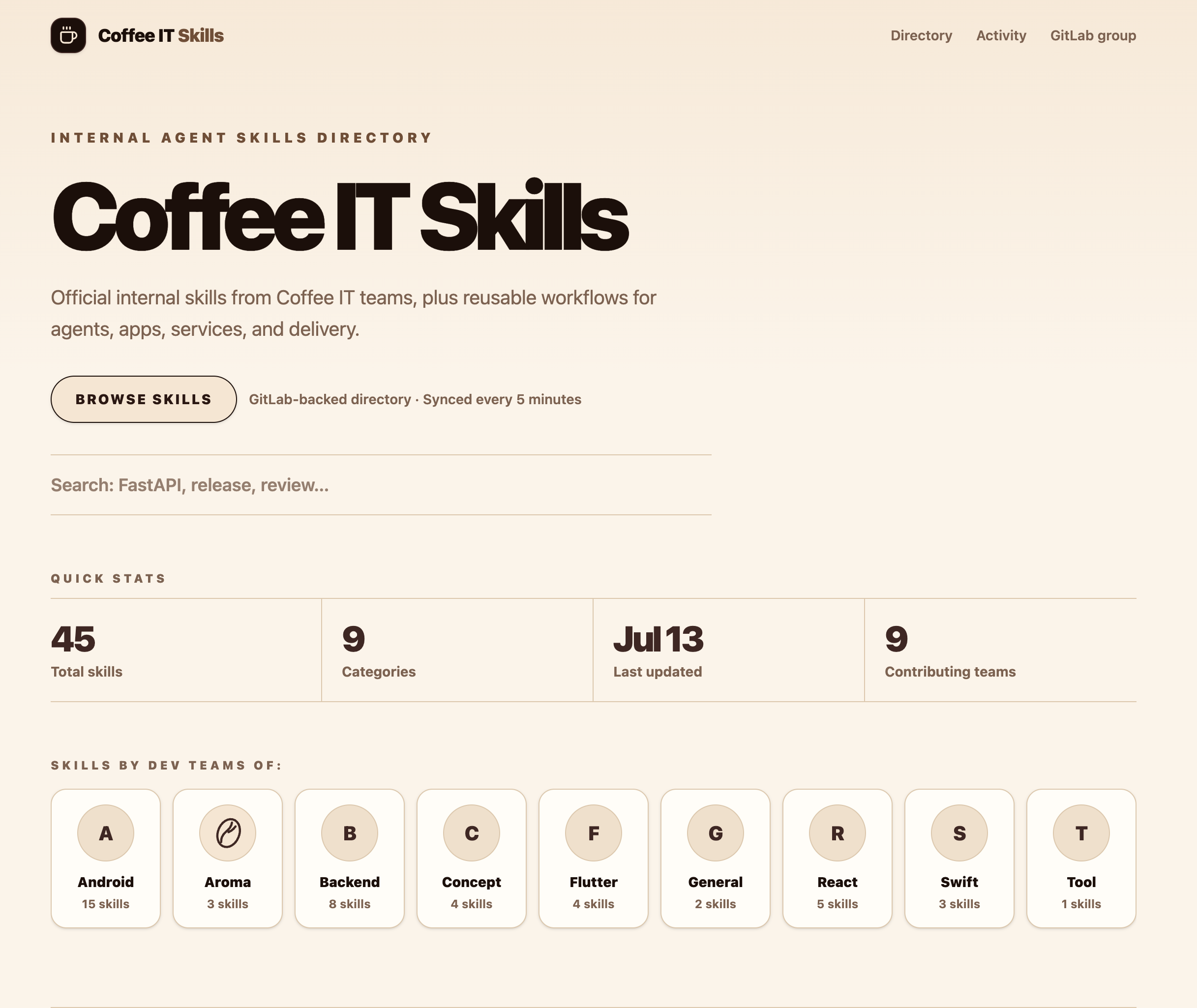
So we built an internal skill site: a clear place where colleagues can see which skills are available, what they are for and how to use them. The repository remains the source of truth; the site makes skills accessible.
What this means for teams working with AI
You do not need a shared repository to adopt the idea behind skills. It is about a shift in thinking:
To conclude
We are still discovering everything that is possible. New skills are added as soon as someone notices that a task keeps coming back, and that a structured approach delivers more than typing it out again every time.
If you work with AI (and more and more teams do), the question is not whether you share knowledge, but how. Skills, version control and a shared repository are our answer. Not perfect, but practical.
Curious how we use AI, or want to talk through skills in your team? Get in touch with Coffee IT.